Increse internet speed by 20% without any software – Microsoft reserves 20% of your available bandwidth for their own purposes like Windows Updates and interrogating your PC etc. By unreserving this bandwidth, you can make your internet connection faster. By 20%. The steps to do so are –ENJOY 1. Click Start then Run and type "gpedit.msc" without quotes. 2. Then go to Local Computer Policy>Computer Configuration>Administrative Templetes>Network>QoS Packet Scheduler. Click on QoS Packet Scheduler. In the right side , find Limit Reservable Bandwidth and double click on Limit Reservable Bandwidth. 3. It will say it is not configured but the truth is under the ‘Explain’ tab. Select ‘Enable’ and set reservable bandwidth to zero. 4. Click on ‘Apply’ and your internet speed will boost up by 20%. ENJOY :) ;)
Showing posts with label Tips & Tricks. Show all posts
Showing posts with label Tips & Tricks. Show all posts

Download Entire Facebook Albums of your friends with Comments
Monday, 23 December 2013
Download Entire Facebook Albums of your friends in just few clicks, here are two methods to download the entire Album.Now you can view your lovely albums offline. You can also download albums with or without comments. And you have options to download particular Friend’s album, photos uploaded by your friends in a particular group, photos in which you are tagged and images on pages. You may also select photos in a album that should be downloaded.
Pick&Zip – Download Pictures Without Comments
1. Goto Pick&Zip
2. Login Using Facebook
3. Download Album
4. Now you can also download videos using PicnZip
Albums are downloaded as a Zip which can be extracted later

2. Login Using Facebook
3. Download Album
4. Now you can also download videos using PicnZip
Albums are downloaded as a Zip which can be extracted later
Photo Grabber – Download Pictures with Comments
1. Download Photo Grabber from for Windows or OSX from here
2. Extract and Install
3. Run PhotoGrabber
4. Login, Copy Paste Login Token, Select album and Begin Download
5. Once downloaded you can view photos with comments by clicking on “Viewer” in the download folder or Just view photos without comments

2. Extract and Install
3. Run PhotoGrabber
4. Login, Copy Paste Login Token, Select album and Begin Download
5. Once downloaded you can view photos with comments by clicking on “Viewer” in the download folder or Just view photos without comments
Anti-AdBlock Killer | Reek 6.2 [scripts]
Saturday, 21 December 2013
 Anti-AdBlock Killer | Reek 6.2 [scripts]
Script Summary: Anti-Adblock Killer removes many protections used on some website that force the user to disable the AdBlocker. So you can continue to visit this website without having to disable your AdBlocker. Compatible with the browsers Firefox and Chrome.
Instructions
Step 1 – Install Add-On
Step 1 – Install Add-On
Step 2 – Restart Browser
- After installation (which requires restarting your browser), you are now ready to install userscripts.
Step 3 – Subscribe to Adblock Filter List
- Anti-Adblock Killer | Filters for Adblockers - Subscribe
Step 4 – Install Script
Step 5 – Ready
- Anti AdBlock Killer it ready to kill
- Do not forget to review the script and add it to your favorites
- To report new sites. it is here
Features
- Kill Anti Adblock Protections
- Notify User Box
- Auto Check Update
- Command User Script
- Suggest Features
Why it does not work
- Check if userscript manager is activated.
- Check if Anti AdBlock Killer is activated.
- Check if you have the last version of Anti AdBlock Killer installed.
- Check if you have subscribe to “Anti AdBlock Killer | Filters for Adblockers” - Subscribe
- Check if you have another anti adblock user script installed, please disable or remove it, because it can generate the conflict.
- Check if the site is in “Supported Sites”.
- Consult Discussions
Supported Browsers
 Works fine ! (Recommended)
 Partially works !
 Partially works !
 Partially works !
 No works !
- I recommend you to use Firefox + Greasemonkey + Adblock Plus.
Hide Data in Image, Audio and Video Files: Steganography
Tuesday, 17 December 2013
Ever wondered to know how to hide secret data in image, audio and video files? Well, in this post I will take you through a concept called steganography using which, it is possible to hide your secret information in image files, songs or any other file of your choice. At the end of this post, you can also download free stegnographic tools and start hiding your data.
What is Steganography?

Steganography is a means of obscuring data where secret messages are hidden inside computer files such as images, sound files, videos and even executable files so that, no one except the sender and the receiver will suspect the existence of stealth information in it. Steganography may also involve the usage of cryptographywhere the message is first encrypted before it is concealed in another file. Generally, the messages appear to be something else such as an image, sound or video so that the transfer of secret data remains unsuspected.
The main advantage of steganography over other methods such as cryptography is that, it will not arose suspicion even if the files fall in the hands of a third party. Unlike cryptographic messages, stegnographic messages will no way attract the attention of a third party by themselves. Thus stegnanography has an upper hand over cryptography as it involves both encryption and obscurity.
What are the Applications of Steganography?
Steganography is mainly used to obscure confidential information/data during storage or transmission. For example, one can hide a secret message in an audio file and send this to another party via email instead of sending the message in the textual format. The receiver on the other end will decrypt the hidden message using the private decryption key. In a worst case scenario, even if a third party does manage to gain access to the email, all he can find is the audio file and not the hidden data inside it. Other usage of steganography include digital watermarking of images for reasons such as copyright protection.
Even though steganography has many useful applications, some may use this technique for illegitimate purposes such as hiding a pornographic content in other large files. Rumors about terrorists using steganography for hiding and communicating their secret information and instructions are also reported. An article claiming that, al-Queda had used steganography to encode messages in images and transported them via e-mails, was reported by New York Times, in October 2001.
How do Steganography Tools Work?
Stegnography tools implement intelligent algorithms to carefully embed the encrypted text messages or data inside other larger files such as an image, audio, video or an executable file. Some tools will embed the encrypted data at the end of another file so that there will be enough room for storing larger data.
There are many steganography tools available online but only a few are able to work flawlessly. I did not find any tool that worked perfectly on both small and large data. However, I have managed to develop my own tool that can work perfectly on all types of files and all size of data. The tool is called “Stego Magic“. You can download it from the following link.
The zip file contains two versions of Stego Magic: One for encrypting the text messages and the other for encrypting binary files. StegoMagic_TXT can be used to hide text messages in other files such as an image or a sound file. StegoMagic_BIN can be used to hide one binary file in another such as an executable file inside an image or an image inside a video file.
With Stego Magic, there is no limitation on the size and type of the file that you are intending to hide. For example, you can hide a video of size 1 GB in an image of size 1 MB or hide an executable file inside a WORD document. The tool is pretty straightforward to use and requires no special understanding of the concept.
At the end of the encryption process, a secret decryption key will be generated and the same is required during the decryption process.
How to Use Stego Magic?
Suppose you want to hide a text message inside a JPG file:
- Place the JPG and the text file (.txt) in the same folder as that of StegoMagic_TXT.exe
- Run StegoMagic_TXT.exe and follow the screen instructions to embed the text message inside the JPG image.Please note that if you’re using Windows 7/Vista, right-click the file and select “Run as Administrator”. Otherwise the tool may fail to work properly.
- Note down the secret decryption key.
Now you can send this image to your friend via email. To decrypt the hidden message, your friend should load this JPG file onto the Stego Magic tool and use the secret decryption key.
How To Access Blocked Websites In Schools/Offices/Universities Etc

Hate this message..??
Many websites like Facebook, YouTube etc may be blocked in your college or office. Its quite usual. But it in many case it is essential to open these websites even for our studies. Then any method to open these blocked websites?? Here it is, tricks to open blocked sites and surf the the web anonymously. I have explained three methods below. One is using IP address, with the help of Proxy Servers and finally web2main. Try it and give me your feedback please..
Open and Surf Blocked Websites Anonymously
Method 1: By Finding Website's IP Address
1) Go to Start > Run.
2) In the box appears type “cmd”
3) A black box appears. Paste the following in to it.
ping www.google.com
and press enter (change www.google.com to any site you want).
4) An IP address will be shown in brackets []. Copy it.
5) Open your browser and paste the IP address in address bar and press enter.
done
Method 2: By Proxy Servers
Proxy server or proxy sites are websites which allow you to browse a site in your browser without monitoring. Because the ip address will be different. Even if you open a site like Facebook through any of the proxy site they cant see "http://www.facebook.com" in the address bar. Only the proxy site's URL.
List of Top 10 Proxy sites
- www.Free-web-proxy.de
- www.aniscartujo.com/webproxy/
- www.Anonymouse.org
- www.Hidemyass.com
- www.Daveproxy.co.uk
- www.Dumbdream.com
- www.Kproxy.com
- www.Polysolve.com
- www.Megaproxy.com/freesurf
- www.Anonproxy.eu
Method 3: Send Webpages to Email
Sounds cools, isn't it? Yes web2mail allows you to receive websites as email. Which means simply give the address to web2mail, then will send you the site (you have to sign up first). Just open the mail, you can see the webpage. Try Google.com so that you can browse entire web from email itself. Know Another method to open blocked websites.
Leave A Comment And Get Your Credit For The TRICK ..
How To Complete A Download Offer(Survey) With Sandboxie
So I came to know about this trick 2 months earlier but till yesterday was not able to make it out... But soon I found all posts were lacking some or what thing so I made up my mind to have a post on Something New and that too complete and possible to follow....
We All Come Across Surveys Whenever We Want to Download Our Loving Softwares , Games And other Files .
Surveys Are the only thing which we hate after premium contents which is one of a Best way to Grab CASH or to Increase Download hits ! . So Welcome back to Pirated Hacker. Today I am Sharing A Better Way of
Skipping/Completing these Surveys(Download-Offer) . We will Use A Freeware Called SandBoxie in windows 7 ! You May Use Any Windows OS xp,7,vista,8,8.1 , Follow Steps Below !
Step 1:

Step 2:
After installation, the Sandboxie window should come up. Close any prompts that may come up, right click 'Sandbox DefaultBox', and select 'Run Sandboxed>Run Web Browser'. A new window with your default browser will come up.

If Firefox gives you an error 'Firefox is already running, but is not responding. To open a new window, you must first close the existing Firefox process, or restart your system.', just try opening it through Sandboxie again and it should work. You can tell that Firefox is running sandboxed when you see a pair of ' around the window name in your taskbar.

Step 3:
Copy and paste your Survey link into the Sandboxed browser. When you see the infamous 'Complete a Quick Survey to Continue!' box, there should be at least one option to download some sort of game or toolbar. A lot of the time they don't go right out and say that it's a download just from the description, but ones that usually don't ask for your opinion/personal info are the download ones. If you're not sure, just click on them to check. I'm going to do the 'Blow up all the balloons' one.
Step 4:
On the new page, click the Download or Play Now button for whatever page Sharecash sent you to, and download the file.

If Sandboxie brings a prompt up asking to recover files out of the Sandbox, click 'Close'.

Step 5:
Run the file from the browser and before going on with the installation, ensure that you're running it sandboxed by looking for those in the window name like we did before.

Go on with the installation. I recommend that you uncheck any offers to install software that's unnecessary to going through the installation. It won't hurt anything if you do, but it just takes longer.

Step 6:
Now that you've completed the installation, a page may open up, and $harecash should detect that you've installed it.

This time, however, when you download the actual file you were trying to, select 'Recover' when the Sandboxie prompt comes up.

Step 7:
Now, to clean everything up, we're going to go to the Sandboxie Control, right click, and select 'Delete Contents'. Select 'Delete Contents' on the next prompt and anything in the Sandboxie process tree should close. Now you're clean!

Any Problem Comment Below
Thank You For Reading ! Share it To Your Friends !
Keep Visiting Pirated Hacker
For Regular Updates Like Us on Facebook
Dragon City Hack | Get All Dragon and All Habitat For Free
Sunday, 15 December 2013

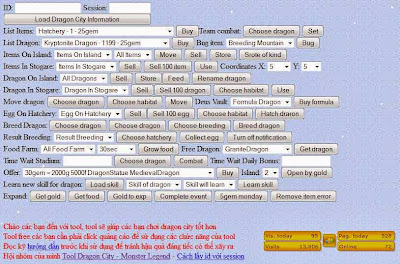
Dragon City hack Olympus Event (New event tools from vutran), update Sunday, December 15, 2013. (use proxy)
Link tools Olympus Event:
1. Olympus Event Link 1
2. Olympus Event Link 2
Dragon City Hack Event, Gems, Free Food, Exp, Gold, Dragon, Island, Cleaning items on the island like rock, tree, other and many more Update Monday, December 02, 2013.Update for Dragon City Site Tools (link tools).
Tutorial how to use Dragon City Hack Get All Dragon and All Habitat For Free:
- Log in to your facebook account and play Dragon City
- Find your facebook id and session id, to how to find facebook id and session id by Viewing the frame Soucre (You can find it by pressing ctrl+g and then "session" and "user" respectively")
- After that open this site:
DC Site Tools 1
DC Site Tools 2
DC Site Tools 3
DC Site Tools 4
you will be asked to fill out facebook id and session id, fill with your facebook id and session id - After it all filled and then click submit.
- The final step, reload your dragon city and see you storage
- NOTE: Use this tool if you have reached level seven or more.
How To run Android Games On PC
Saturday, 14 December 2013
How To run Android Games On PC

Aslam-o-Alaikum in this post I’m going to show you how to use free software called BlueStack . It is app player for windows where you can run all your favorite android apps on your pc .
1) Download and Install BlueStacks


2) You can download and use any android apps and run it on your pc. If you’re looking for specific app , click on App search and type specific app in the search bar . Click on it and download+installing process will begin .
How to sync your Android phone with PC
BlueStacks lets you sync apps, photos and SMS messages between your phone and PC? Here’s how:
1) If you want to sync your Android phone with PC. Go to Settings and click on Cloud Connect .


2) Set up your BlueStack account


3) Install the BlueStacks Cloud Connect app from the Android Market to your phone.
4)Open the app and pair your phone with your PC by typing in your PIN:
5)Select whether or not you want to receive SMS messages simultaneously on your PC via BlueStacks . Click “Login” and you are done!
Wireless Hacking
Tuesday, 10 December 2013
Wireless Hacking


Features:
The Oxid team has just released the newest version of cain and abel software i.e. Cain andabel 4.9.40, Here are some of the added features in cain and abel 4.9.40:
- Added Proxy support for Cain’s Certificate Collector.
- Added the ability to specify custom proxy authentication credentials for Certificate Collector.
- Added ProxyHTTPS Man-in-the-Middle Sniffer (TCP port 8080).
- HTTP, APR-HTTPS and APR-ProxyHTTPS sniffer filters are now separated.
- Added progress bar indicator in the off-line capture file function.
- Bug fixed in ProxyHTTPS Man-in-the-Middle Sniffer parsing “Connection Established” string.
- Bug fixed in VoIP Sniffer creating MP3 Mono files.
- Bug fixed in RTP Sniffer processing off-line capture files.
- WinRTGen recompiled with OpenSSL library version 0.9.8q.
- OpenSSL library upgrade to version 0.9.8q.
- Winpcap library upgrade to version 4.1.2.
Change Log :
You can download Cain and Abel 4.9.43 here
- Added SAP R/3 sniffer filter for SAP GUI authentications and SAP DIAG protocol decompression.
- Added support for Licensing Mode Terminal Server connections to Windows 2008 R2 servers in APR-RDP sniffer filter.
- Added support for MSCACHEv2 Hashes (used by Vista/Seven/2008) in Dictionary and Brute-Force Attacks.
- Added MSCACHEv2 Hashes Cryptanalysis via Sorted Rainbow Tables.
- Added MSCACHEv2 RainbowTables to WinRTGen v2.6.3.
- MS-CACHE Hashes Dumper now supports MSCACHEv2 hashes extraction from Windows Vista/Seven/2008 machines and offline registry files.
- Fixed a bug (crash) in Certificate Collector with Proxy settings enabled
MAKING FACEBOOK PHISHING SITE TUTORIAL
MAKING FACEBOOK PHISHING SITE TUTORIAL

In my previous article I taught you people how to make a Phishing site. ( The articles is here ). Now in this article i am going to teach you how to set up the Phishing site, which is the Difficult task than making a Phishing site.
Step 1: The First Step in Making the site is to regester an account at http://www.000webhost.com/order.php (if you have account than you can skip first 2 steps)
Step 3: Now Download this FILE (http://adf.ly/Lytss ) UPDATED LINK .
Step 4: Now Goto http://members.000webhost.com/ and Log into your account.

Step 5: Now when you are logged into your account click on the Go to Cpanel in front of your domain that you had registered, and then Go to File Manager under Files and log into it.
.
Step 6: Now Click on the Public_html.

Step 7: Now click on the Upload button, choose the file under the Archives that you have downloaded, to be uploaded.

NOTE::: To access the input data ( Usernames and Password ) Goto the Following Address:
http://www.yoursitesadress.p4o.net/lol.html
If I am not clear in any point Please ask me in comments below.
THE DOWNLOAD LINK TO facebook.zip is http://adf.ly/73Q4s
PS:> If www.p4o.net didn’t worked for you, you can use :
www.drivehq.com
www.yourfreehosting.net
www.esmartstart.com
=============================================================
The Input Data (Email and Password) will look like following:

UPDATE:
Now if you have successfully made the Phishing page(site) then you must know that on Facebook you cannot post it, mail it, or sent it in chat. e.g: www.yoursite.p4o.net. This is because Facebook dont allow the T35.com sites. So Solution to this problem is to use http://www.dot.tk for the URL hiding.
All you have to do is to Goto http://www.dot.tk , on the main page enter your Phishers address and get a domain for that. Like for www.myphisher.p4o.net you gets www.myphisher.tk. And facebook will allow you to post it
HOW TO FIND YOUR USERNAME?
Ok guys this is the most asked question of all so here is a simple answer, just look in the following picture of Admin Paned the red shaded area tells you the username of the website


